
Introduction
1. Client-side AI là gì?
Client-side AI (hay In-browser AI) cho phép chúng ta chạy các mô hình trí tuệ nhân tạo trực tiếp trên trình duyệt của người dùng mà không cần gửi dữ liệu về máy chủ (Server/Backend).
- Privacy First: Dữ liệu đầu vào (input) không bao giờ rời khỏi thiết bị của người dùng.
- Zero Server Cost: Tận dụng tài nguyên phần cứng (CPU/GPU) của người dùng thay vì thuê server đắt đỏ.
- Offline Capable: Sau khi tải model, ứng dụng có thể hoạt động ngay cả khi mất mạng.
2. Cách thức hoạt động (How it works)
- Sử dụng WebGPU: Một API đồ họa hiện đại cho phép trình duyệt truy cập trực tiếp vào GPU của máy tính để tính toán song song hiệu năng cao.
- WebAssembly (WASM): Giúp chạy mã code hiệu năng gần như native speed trên môi trường web.
- Thay vì gọi API của OpenAI hay Gemini Cloud, chúng ta load file weights của model (ví dụ: Gemma 2B) về cache trình duyệt và thực hiện Inference tại chỗ.
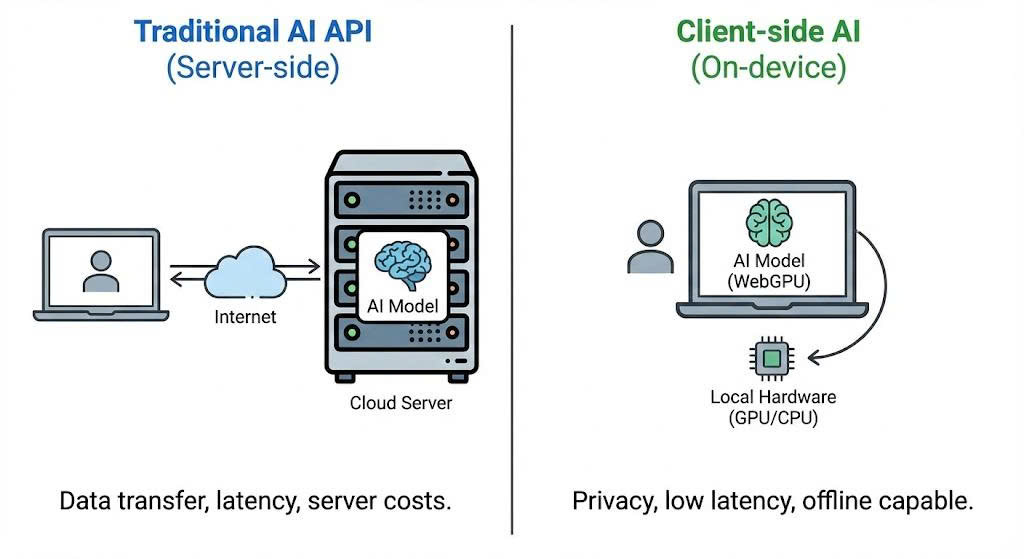
Sự khác biệt giữa Server-side Inference và Client-side Inference
More: Google MediaPipe LLM Inference
Prerequisites (Yêu cầu hệ thống)
Browser & Hardware
Note: Vì WebGPU là công nghệ mới, bạn cần đảm bảo môi trường chạy đáp ứng đủ yêu cầu để tránh việc trình duyệt bị crash do thiếu bộ nhớ VRAM.
I. Trình duyệt hỗ trợ
- Google Chrome / Edge: Version 113 trở lên (Đã hỗ trợ WebGPU mặc định).
- Firefox/Safari: Đang trong giai đoạn thử nghiệm (cần bật flag thủ công).
II. Phần cứng khuyến nghị (Cho Gemma 2B/Similiar Models)
- GPU: Hỗ trợ WebGPU (NVIDIA GTX 1060 trở lên, Apple Silicon M1/M2/M3, hoặc AMD Radeon tương đương).
- VRAM: Tối thiểu 4GB VRAM để load model mượt mà.
- RAM: Tối thiểu 8GB System RAM.
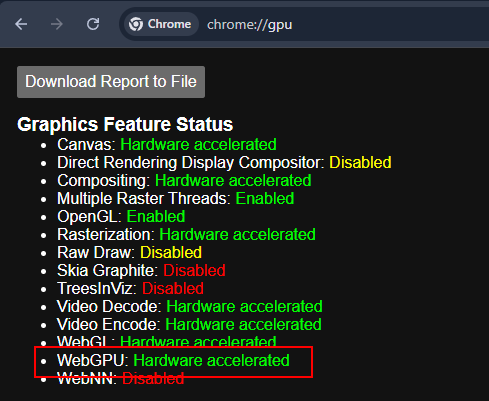
Kiểm tra trạng thái WebGPU: Hardware acceleration phải được enable.
Implementation (Triển khai)
Trong bài hướng dẫn này, chúng ta sẽ sử dụng MediaPipe LLM Inference API của Google để chạy model gemma-3n-E2B-it-litert-lm. Model này đủ nhẹ (chỉ khoảng hơn 3GB) để chạy trên web nhưng vẫn đủ thông minh cho các tác vụ cơ bản.
Chúng ta sẽ tạo một project HTML/JS đơn giản. Bạn không cần setup backend phức tạp.
1. Cấu trúc thư mục và tải model
nquangit@local-dev:~/ai-projects/gemma-web$ tree
.
├── index.html
├── gemma-3n-E2B-it-int4-Web.litertlm
└── index.js

0 directories, 3 files
nquangit@local-dev:~/ai-projects/gemma-web$
File model gemma-3n-E2B-it-int4-Web.litertlm bạn có thể tìm và tải từ Hugging Face - Google
Bạn cần phải đăng nhập Hugging Face và yêu cầu quyền truy cập model từ Google trước khi có thể tải về. Ngoài ra bạn có thể dùng bât kỳ model LitERT-LM nào khác có định dạng tương tự.
2. HTML UI
Bạn có thể dùng NPM hoặc CDN. Để đơn giản cho việc demo, mình sẽ dùng CDN trong file index.html.
Ngoài ra thì mình có thêm một tí CSS để giao diện đẹp hơn.
<!DOCTYPE html>
<html lang="en">
    <head>
        <title>LLM Inference Web Demo</title>
        <meta charset="UTF-8">
        <meta name="viewport" content="width=device-width, initial-scale=1.0">
        <style>
            * {
                margin: 0;
                padding: 0;
                box-sizing: border-box;
            }

            body {
                font-family: 'Segoe UI', Tahoma, Geneva, Verdana, sans-serif;
                background: linear-gradient(135deg, #1a1a2e 0%, #16213e 50%, #0f3460 100%);
                min-height: 100vh;
                padding: 20px;
                color: #e4e4e4;
            }

            .container {
                max-width: 900px;
                margin: 0 auto;
            }

            header {
                text-align: center;
                margin-bottom: 30px;
            }

            header h1 {
                font-size: 2.2rem;
                font-weight: 600;
                background: linear-gradient(90deg, #00d4ff, #7b2cbf);
                -webkit-background-clip: text;
                -webkit-text-fill-color: transparent;
                background-clip: text;
                margin-bottom: 8px;
            }

            header p {
                color: #94a3b8;
                font-size: 0.95rem;
            }

            .chat-container {
                background: rgba(255, 255, 255, 0.05);
                backdrop-filter: blur(10px);
                border-radius: 16px;
                border: 1px solid rgba(255, 255, 255, 0.1);
                padding: 24px;
                box-shadow: 0 8px 32px rgba(0, 0, 0, 0.3);
            }

            .section {
                margin-bottom: 20px;
            }

            .section:last-child {
                margin-bottom: 0;
            }

            label {
                display: block;
                font-size: 0.85rem;
                font-weight: 500;
                color: #94a3b8;
                margin-bottom: 8px;
                text-transform: uppercase;
                letter-spacing: 0.5px;
            }

            textarea {
                width: 100%;
                height: 180px;
                padding: 16px;
                border: 1px solid rgba(255, 255, 255, 0.1);
                border-radius: 12px;
                background: rgba(0, 0, 0, 0.3);
                color: #e4e4e4;
                font-family: 'Consolas', 'Monaco', monospace;
                font-size: 0.95rem;
                line-height: 1.6;
                resize: vertical;
                transition: border-color 0.3s ease, box-shadow 0.3s ease;
            }

            textarea:focus {
                outline: none;
                border-color: #00d4ff;
                box-shadow: 0 0 0 3px rgba(0, 212, 255, 0.1);
            }

            textarea::placeholder {
                color: #64748b;
            }

            #output {
                background: rgba(0, 0, 0, 0.4);
                min-height: 200px;
            }

            .button-container {
                display: flex;
                justify-content: center;
                margin: 24px 0;
            }

            #submit {
                padding: 14px 40px;
                font-size: 1rem;
                font-weight: 600;
                color: white;
                background: linear-gradient(135deg, #00d4ff 0%, #7b2cbf 100%);
                border: none;
                border-radius: 50px;
                cursor: pointer;
                transition: all 0.3s ease;
                box-shadow: 0 4px 15px rgba(0, 212, 255, 0.3);
            }

            #submit:hover:not(:disabled) {
                transform: translateY(-2px);
                box-shadow: 0 6px 20px rgba(0, 212, 255, 0.4);
            }

            #submit:active:not(:disabled) {
                transform: translateY(0);
            }

            #submit:disabled {
                background: linear-gradient(135deg, #4a5568 0%, #2d3748 100%);
                cursor: not-allowed;
                box-shadow: none;
            }

            #submit.loading {
                position: relative;
                color: transparent;
            }

            #submit.loading::after {
                content: '';
                position: absolute;
                width: 20px;
                height: 20px;
                top: 50%;
                left: 50%;
                margin-left: -10px;
                margin-top: -10px;
                border: 3px solid rgba(255, 255, 255, 0.3);
                border-radius: 50%;
                border-top-color: white;
                animation: spin 1s linear infinite;
            }

            @keyframes spin {
                to { transform: rotate(360deg); }
            }

            .status-bar {
                display: flex;
                align-items: center;
                justify-content: center;
                gap: 8px;
                padding: 12px;
                background: rgba(0, 0, 0, 0.2);
                border-radius: 8px;
                margin-top: 16px;
            }

            .status-indicator {
                width: 10px;
                height: 10px;
                border-radius: 50%;
                background: #64748b;
            }

            .status-indicator.loading {
                background: #fbbf24;
                animation: pulse 1.5s infinite;
            }

            .status-indicator.ready {
                background: #22c55e;
            }

            @keyframes pulse {
                0%, 100% { opacity: 1; }
                50% { opacity: 0.5; }
            }

            #status-text {
                font-size: 0.85rem;
                color: #94a3b8;
            }

            footer {
                text-align: center;
                margin-top: 24px;
                color: #64748b;
                font-size: 0.8rem;
            }

            footer a {
                color: #00d4ff;
                text-decoration: none;
            }

            footer a:hover {
                text-decoration: underline;
            }

            @media (max-width: 600px) {
                body {
                    padding: 12px;
                }

                header h1 {
                    font-size: 1.6rem;
                }

                .chat-container {
                    padding: 16px;
                }

                textarea {
                    height: 140px;
                    font-size: 0.9rem;
                }

                #submit {
                    width: 100%;
                    padding: 16px;
                }
            }
        </style>
    </head>
    <body>
        <div class="container">
            <header>
                <h1>🤖 AI Chat Demo</h1>
                <p>Powered by MediaPipe LLM Inference</p>
            </header>

            <div class="chat-container">
                <div class="section">
                    <label for="input">Your Message</label>
                    <textarea id="input" placeholder="Type your message here..."></textarea>
                </div>

                <div class="button-container">
                    <button id="submit" disabled>Get Response</button>
                </div>

                <div class="section">
                    <label for="output">AI Response</label>
                    <textarea id="output" readonly placeholder="Response will appear here..."></textarea>
                </div>

                <div class="status-bar">
                    <div id="status-indicator" class="status-indicator loading"></div>
                    <span id="status-text">Loading model...</span>
                </div>
            </div>

            <footer>
                <p>Built with <a href="https://ai.google.dev/edge/mediapipe/solutions/genai/llm_inference/web_js" target="_blank">MediaPipe GenAI</a></p>
            </footer>
        </div>
        <script type="module" src="index.js"></script>
    </body>
</html>
3. JavaScript Logic
Chúng ta cần load FilesetResolver (WASM binaries) và khởi tạo LlmInference.
Đồng thời xử lý sự kiện khi người dùng nhấn nút gửi câu hỏi và hiển thị kết quả trả về.
Lưu ý: Model Gemma gemma-3n-E2B-it-litert-lm có dung lượng khoảng 3.4GB. Lần đầu load sẽ tốn thời gian tùy thuộc vào tốc độ mạng.
// Bạn có thể lấy file này từ [Google AI Edge](https://github.com/google-ai-edge/mediapipe-samples/blob/main/examples/llm_inference/js/index.js)
// index.js

import {FilesetResolver, LlmInference} from 'https://cdn.jsdelivr.net/npm/@mediapipe/tasks-genai';

const input = document.getElementById('input');
const output = document.getElementById('output');
const submit = document.getElementById('submit');
const statusIndicator = document.getElementById('status-indicator');
const statusText = document.getElementById('status-text');

const modelFileName = 'gemma-3n-E2B-it-int4-Web.litertlm'; /* Update the file name */

/**
 * Update the status bar UI
 */
function updateStatus(state, message) {
  statusIndicator.className = 'status-indicator ' + state;
  statusText.textContent = message;
}

/**
 * Display newly generated partial results to the output text box.
 */
function displayPartialResults(partialResults, complete) {
  output.textContent += partialResults;
  // Auto-scroll to bottom
  output.scrollTop = output.scrollHeight;

  if (complete) {
    if (!output.textContent) {
      output.textContent = 'Result is empty';
    }
    submit.disabled = false;
    submit.classList.remove('loading');
    submit.textContent = 'Get Response';
    updateStatus('ready', 'Ready');
  }
}

/**
 * Main function to run LLM Inference.
 */
async function runDemo() {
  const genaiFileset = await FilesetResolver.forGenAiTasks(
      'https://cdn.jsdelivr.net/npm/@mediapipe/tasks-genai/wasm');
  let llmInference;

  submit.onclick = () => {
    if (!input.value.trim()) {
      input.focus();
      return;
    }
    output.textContent = '';
    submit.disabled = true;
    submit.classList.add('loading');
    submit.textContent = '';
    updateStatus('loading', 'Generating response...');
    llmInference.generateResponse(input.value, displayPartialResults);
  };

  // Allow Ctrl+Enter to submit
  input.addEventListener('keydown', (e) => {
    if (e.ctrlKey && e.key === 'Enter' && !submit.disabled) {
      submit.click();
    }
  });

  updateStatus('loading', 'Loading model...');
  submit.textContent = 'Loading...';

  LlmInference
      .createFromOptions(genaiFileset, {
        baseOptions: {modelAssetPath: modelFileName},
        // maxTokens: 512,  // The maximum number of tokens (input tokens + output
        //                  // tokens) the model handles.
        // randomSeed: 1,   // The random seed used during text generation.
        // topK: 1,  // The number of tokens the model considers at each step of
        //           // generation. Limits predictions to the top k most-probable
        //           // tokens. Setting randomSeed is required for this to make
        //           // effects.
        // temperature:
        //     1.0,  // The amount of randomness introduced during generation.
        //           // Setting randomSeed is required for this to make effects.
      })
      .then(llm => {
        llmInference = llm;
        submit.disabled = false;
        submit.textContent = 'Get Response';
        updateStatus('ready', 'Model loaded • Ready');
      })
      .catch((error) => {
        console.error('Failed to initialize:', error);
        updateStatus('', 'Failed to load model');
        submit.textContent = 'Error';
        alert('Failed to initialize the task.');
      });
}

runDemo();
Chạy thử
Sau khi code xong, bạn cần chạy file index.html thông qua một HTTP Server (WebGPU yêu cầu Secure Context hoặc localhost).
Sử dụng HTTP server bất kỳ hoặc extension Live Server của VSCode.
Mở trình duyệt và test thử:
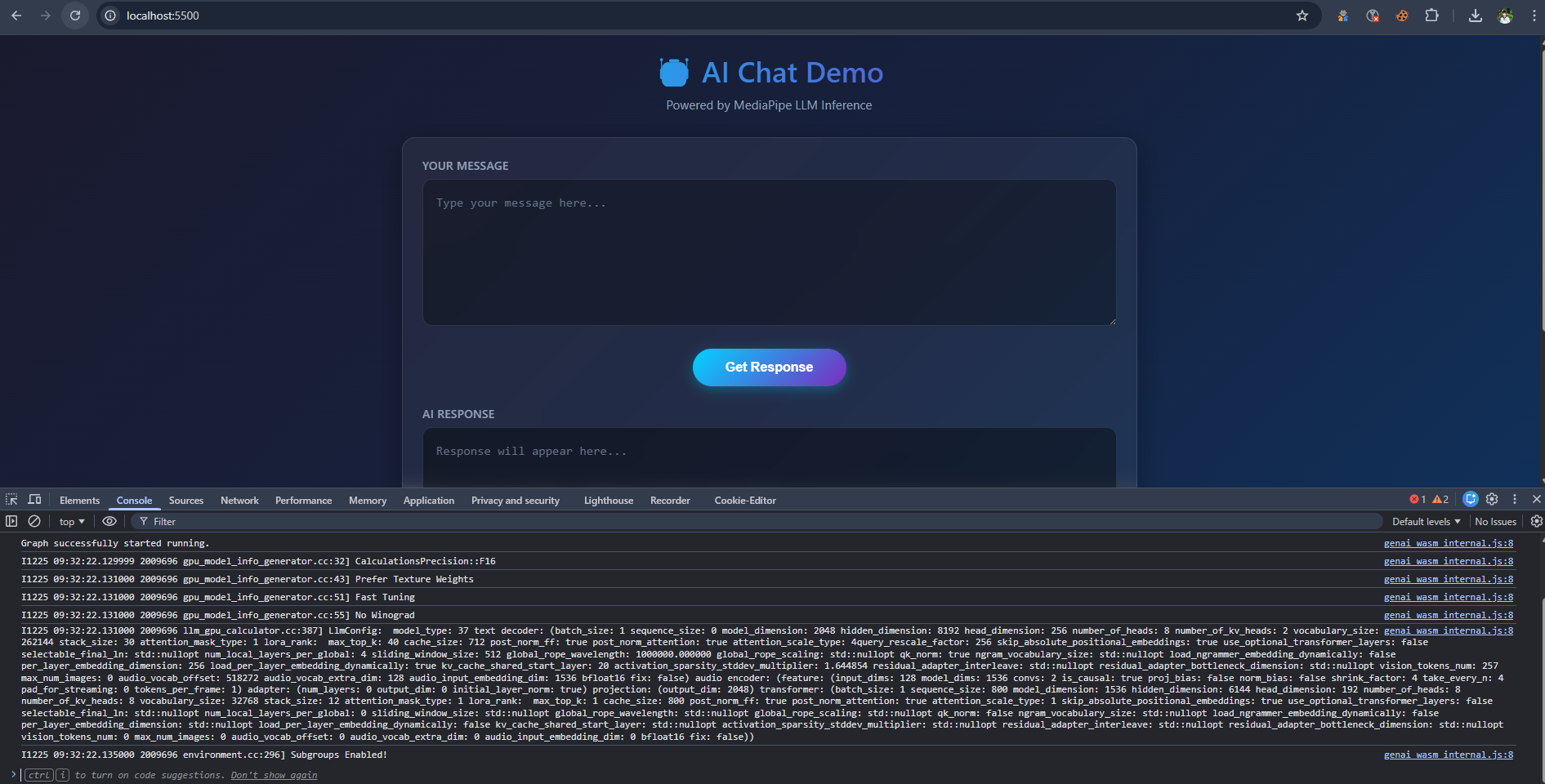
Console log quá trình khởi tạo
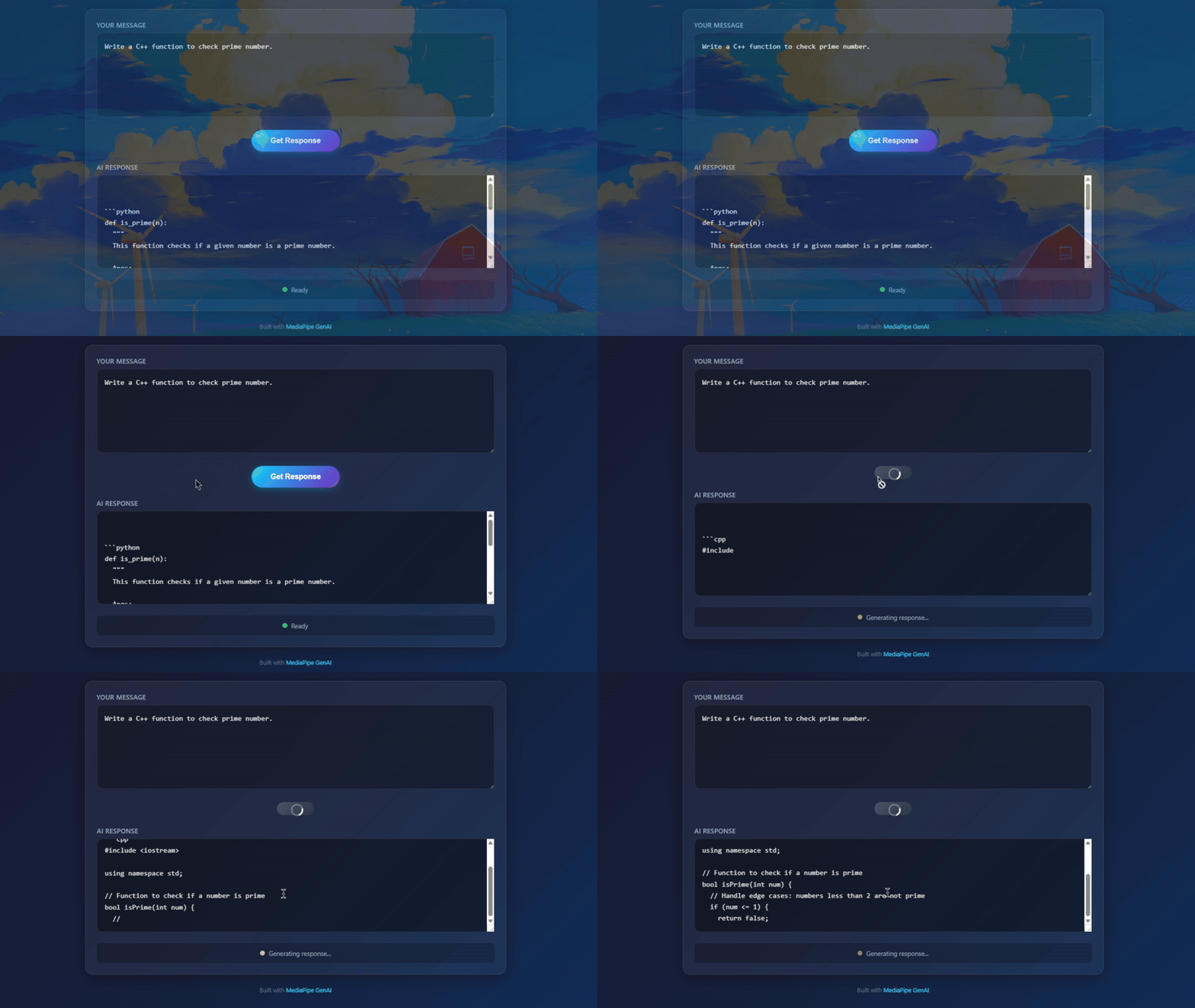
Kết quả khi chạy thực tế trên Chrome
Chúng ta thử hỏi một câu hỏi về coding:
User: Write a Python function to check prime number.
AI Response:
def is_prime(n):
  """
  This function checks if a given number is a prime number.

  Args:
    n: The number to check.

  Returns:
    True if the number is prime, False otherwise.
  """
  if n <= 1:
    return False
  for i in range(2, int(n**0.5) + 1):
    if n % i == 0:
      return False
  return True
Nếu bạn thấy tốc độ render text nhanh tương đương khi gõ phím, thì chúc mừng, WebGPU đang hoạt động tốt trên máy bạn!
Lưu ý: Đoạn code trên chưa có những biện pháp để lưu trữ model để lần sau không phải tải lại (ví dụ: IndexedDB) nên nếu reload trang sẽ phải tải lại model từ đầu (mặc dù nếu là localhost thì tốc độ tải sẽ rất nhanh).
Conclusion
Việc chạy LLM trực tiếp trên trình duyệt mở ra rất nhiều tiềm năng cho các ứng dụng Web 3.0 và bảo mật.
- Ưu điểm: Bảo mật, miễn phí vận hành server, hoạt động offline.
- Nhược điểm: Tải model lần đầu nặng (GBs), phụ thuộc phần cứng người dùng.
Với sự tối ưu của Google MediaPipe và sự phổ biến của WebGPU, rào cản này đang dần được xóa bỏ.
Hẹn gặp lại các bạn ở các bài viết sau về tối ưu hóa model với WebLLM!

Leave a comment